For residential painters
Bid the job before you leave the driveway.
Scan the room, price it at your own rates, and send a proposal your client signs on their phone. The deposit goes straight to you.

7 days free, then $299.99/yr. Cancel anytime.
Room scanning needs an iPhone or iPad Pro. Any iPhone or iPad on iOS 17 or later can type measurements.
How it works
Scan or type the room.
Walls, ceiling, trim, doors and windows, measured by a scan on an iPhone or iPad Pro, or typed on any iPhone.
Price it at your rates.
Your labor rate, your production rates, your paints. Every number shown, with a likely range.
Get it signed and paid.
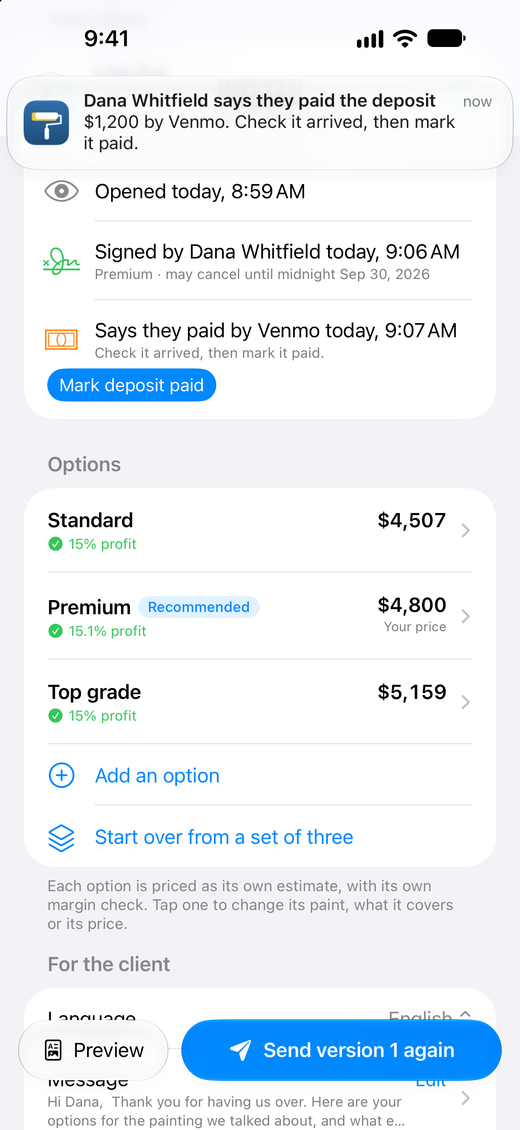
Your client picks Standard, Premium or Top grade, signs on their phone, and pays the deposit to you.
Proposals that win jobs.
Three clear options, a room-by-room breakdown, your logo and your terms. It opens on any phone, with nothing to install.

Every number, shown.
Square feet, coats, gallons, hours, materials, overhead and profit, with the formulas behind them. No AI guesses your price. Each option shows its profit, and flags a price that loses money.

Our promises
We never take a cut of your deposits.
Clients pay you directly: Venmo, PayPal, Cash App, Zelle, Square or Stripe.
Your price never goes up.
Written price lock for as long as you stay subscribed.
Works with no signal.
Basements, new builds, rural jobs. Everything saves as you go.
Your jobs stay yours.
Your jobs and PDFs stay yours, even if you cancel. Signed in, they're backed up to your account, so a new phone gets them back.
One plan, everything in it.
BidCoat Pro
$299.99/yearSave 37%
Or $39.99/month
- Unlimited bids and proposals
- Room scanning (iPhone or iPad Pro)
- E-signatures
- Deposits paid straight to you
- Automatic reminder emails
- English, Spanish and Portuguese
- Written price lock
7-day free trial. Billed by Apple. Cancel anytime in Settings.
Made for painters
One person bids; the crew doesn't need seats.
One flat price, no per-user charges. Use it on your phone and your iPad.
In your language.
English, Spanish and Portuguese, and proposals in whichever your client reads.
Answered by a person.
Real replies from the founder, the same day.
Questions
Do I need an iPhone Pro?
No. Scanning needs a Pro model with LiDAR: iPhone 12 Pro or a later Pro, or iPad Pro (2020 or later). On any other iPhone or iPad with iOS 17 or later, you type each room's length, width and height, and count the doors and windows.
Is there an Android app?
No. BidCoat is for iPhone and iPad. Your clients can open proposals on any phone or computer.
How do my clients pay?
Through your own payment link or details: Venmo, PayPal, Cash App, Zelle, a Square or Stripe link, or a check. BidCoat never touches the money.
Do I have to take a deposit?
No. Set the deposit to 0%, for all proposals or just one. Or keep the deposit but add no payment links, and collect it your own way: a check at the door, cash, or your own invoice.
Can I set my own prices?
Yes. Your labor rate, production rates, paints, markup, overhead, profit and minimum job price. BidCoat never sets your price.
Can I price by the square foot?
Yes. Set your own prices per square foot of wall and ceiling, per foot of trim and per door side. BidCoat works out the square feet from the room's measurements and does the multiplying. Or price by hours at your labor rate. Either way, you see the math.
Can I use my own contract terms?
Yes. Each proposal carries the scope of work, the price, your payment terms, warranty and terms, and the right-to-cancel notice for your state or province. Your client signs it, and you both get a signed copy with a record of the signature. BidCoat comes with wording for each part, and you can replace it with your own. Its wording is a template, not legal advice.
What happens if I cancel?
Your jobs and PDFs stay on your phone and in your account's backup, even if you cancel, and links you've sent keep working. Starting a new job needs a subscription.
Exteriors?
Interiors today: walls, ceilings, trim, doors and closets.
Your next bid, from the driveway.
7 days free, then $299.99/yr. Cancel anytime.